Hytale System Requirements - Can Your PC Run Hytale?
Hypixel Studios has released official Hytale system requirements based on in-house testing. These specs define what hardware you need to run Hytale at different performance levels, from minimum 30 FPS gameplay to high-end streaming setups.
Quick System Requirements Overview
Minimum Requirements (1080p @ 30 FPS)
OS: Windows 10 (64-bit, version 1809) or Windows 11
CPU: Intel Core i5-7500 or AMD Ryzen 3 1200
RAM: 8-12 GB (depends on graphics type)
GPU: NVIDIA GTX 900 Series, AMD Radeon 400 Series, or Intel Arc A-Series
Storage: 20 GB SSD
Network: 2 Mbit/s for multiplayer
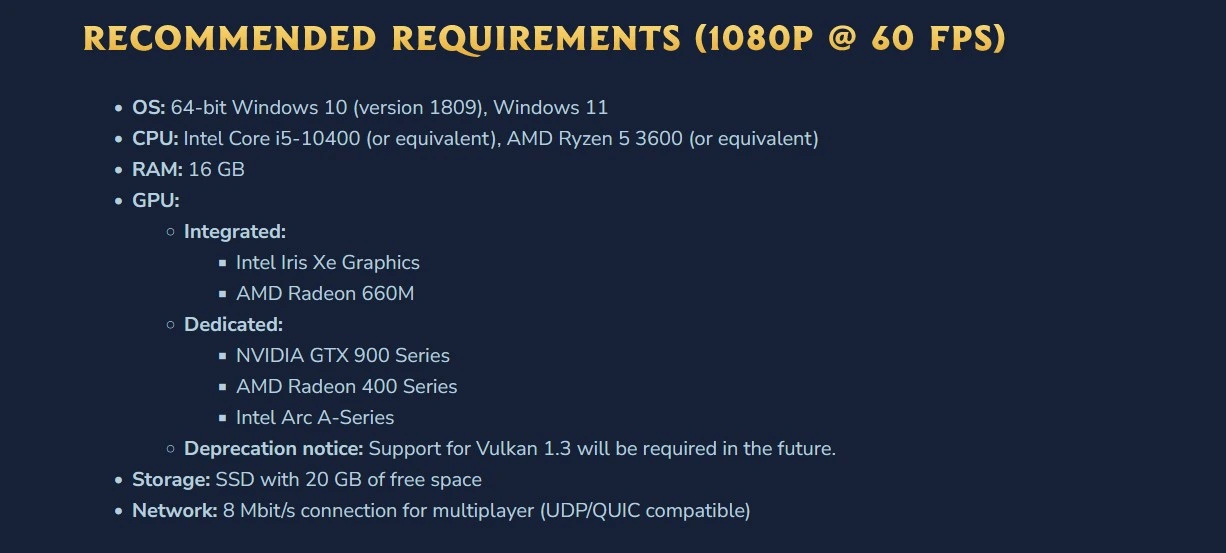
Recommended Requirements (1080p @ 60 FPS)
OS: Windows 10 (64-bit, version 1809) or Windows 11
CPU: Intel Core i5-10400 or AMD Ryzen 5 3600
RAM: 16 GB
GPU: NVIDIA GTX 900 Series, AMD Radeon 400 Series, or Intel Arc A-Series
Storage: 20 GB SSD
Network: 8 Mbit/s for multiplayer
Detailed Hardware Breakdown
CPU Requirements
Hytale is CPU-intensive. The game runs both client and server processes simultaneously in singleplayer, meaning your processor handles rendering, gameplay, world generation, NPC simulation, and voxel logic.
Why CPU Matters:
- Singleplayer runs full server simulation locally
- World generation processes happen on CPU
- NPC behaviors and interactions require processing power
- Voxel calculations and physics run on CPU
Performance Hierarchy:
- Minimum: Quad-core processors from 2017 era (i5-7500, Ryzen 3 1200)
- Recommended: Six-core processors from 2019-2020 (i5-10400, Ryzen 5 3600)
- Streaming: High-end processors (i7-10700K, Ryzen 9 3800X)
Once your GPU meets minimum specs, upgrading CPU provides more performance benefit than upgrading graphics card. This differs from most modern games that prioritize GPU.
GPU Requirements
Graphics card requirements are relatively modest by modern standards. Hytale supports GPUs from 2015-2016 at minimum specs.
Minimum Dedicated GPUs:
- NVIDIA GTX 900 Series (GTX 950, 960, 970, 980)
- AMD Radeon 400 Series (RX 460, 470, 480)
- Intel Arc A-Series
Integrated Graphics Support:
Hytale runs on integrated graphics, though with compromises:
Minimum Integrated:
- Intel UHD Graphics 620
- AMD Radeon Vega 3
Recommended Integrated:
- Intel Iris Xe Graphics
- AMD Radeon 660M
Testing showed Intel HD Graphics 630 achieved 30-34 FPS at 1080p with view distance set to 192 blocks. Integrated graphics require more system RAM (12 GB vs 8 GB).
VRAM Considerations:
Hytale builds large texture atlases and stores world geometry in VRAM. Higher view distances increase VRAM usage significantly. GPUs can run out of VRAM even if specs look sufficient, causing stuttering.
RAM Requirements
Memory requirements vary based on your setup:
8 GB: Multiplayer-only with dedicated GPU
12 GB: Singleplayer with integrated graphics
16 GB: Recommended for smooth gameplay
32 GB: Streaming and content creation
Singleplayer requires more RAM because your PC runs both client and server. Multiplayer reduces RAM needs since the server runs remotely.
Storage Requirements
Installation: 8 GB
Recommended Free Space: 20 GB
Save Files: Varies by exploration
Hytale generates procedurally expanding worlds. Save file sizes depend on exploration:
- 5000x5000 block area: ~661 MB
- Per 32x32 chunk: ~27 KB
Extensive exploration, building, and customization increase storage requirements. More blocks, more variety, more storage consumed.
SSD Strongly Recommended:
Hytale loads world data constantly. SSD provides:
- Faster world loading
- Reduced stuttering when entering new chunks
- Better overall performance
- Smoother gameplay experience
SATA SSDs meet minimum requirements. NVMe SSDs recommended for content creators.
Network Requirements
Download: Required for initial installation (no physical sales)
Offline Mode: Singleplayer works without internet
Multiplayer: Bandwidth depends on view distance
View Distance Bandwidth Usage:
192 blocks (minimum view):
- Minimum: 2 Mbit/s
- Recommended: 4 Mbit/s
384 blocks (recommended view):
- Minimum: 4.5 Mbit/s
- Recommended: 7 Mbit/s
480 blocks (high view):
- Minimum: 6 Mbit/s
- Recommended: 10 Mbit/s
These are worst-case scenarios (traveling at 1.5x speed constantly loading new chunks). Normal gameplay requires less bandwidth. Mining, crafting, and building use minimal network resources.
Minigame Bandwidth:
Small map modes (Skywars, Bedwars, etc.) require very low bandwidth since world data doesn't change frequently.
Upload Speed:
Generally irrelevant. Upload stays under 250 Kbit/s even in demanding scenarios.
View Distance Impact
View distance is Hytale's most impactful performance setting. This defines the radius of visible, loaded, and simulated world around your character.
Performance Impact:
Doubling view distance (192 → 384) quadruples world data:
- 4x more blocks rendered
- 4x more NPCs simulated
- 4x more world chunks loaded
- Exponential performance cost
Recommended View Distances:
192 blocks: Minimum playable experience
384 blocks: Intended gameplay experience (Hypixel's design target)
768 blocks: High-end systems
1024 blocks: Extreme setups only
Hypixel designed Orbis around 384 block view distance. This provides the intended visual experience while remaining accessible to recommended hardware.
Singleplayer vs Multiplayer Performance
Performance varies significantly between game modes.
Singleplayer Demands
Your PC runs:
- Full game client (rendering, UI, gameplay)
- Complete server simulation (NPCs, world generation, networking layer)
- All world updates and chunk generation
- Entity behaviors and interactions
This is the most demanding scenario. Singleplayer requires more CPU and RAM than multiplayer.
Multiplayer Performance
The server runs remotely. Your PC only handles:
- Graphics rendering
- UI and input
- Player character behavior
- Network communication
Multiplayer provides better performance on identical hardware. If your PC struggles with singleplayer, join multiplayer servers for better framerates.
Content Creation Requirements (1440p @ 60 FPS)
Streaming and recording require higher specs for stable performance during capture.
CPU: Intel Core i7-10700K or AMD Ryzen 9 3800X
RAM: 32 GB
GPU: NVIDIA RTX 30 Series, AMD Radeon RX 7000 Series, Intel Arc A-Series
Storage: NVMe SSD with 50+ GB free space
Separate Recording Drive Recommended:
Use a separate SSD for video capture to prevent storage bottlenecks during recording sessions.
Codec Recommendations:
Modern GPUs provide better video quality at lower bitrates. Use AV1 or HEVC encoding when available for optimal streaming quality.
Benchmark Example:
Internal testing (AMD Ryzen 9 9950X3D, NVIDIA RTX 5080, 64 GB DDR5-6000) achieved 400 FPS at 1440p ultrawide with 768 block view distance while recording in AV1.
Special Hardware Considerations
Integrated Graphics
Integrated GPUs can run Hytale but with limitations:
- Lower view distances required (192 blocks recommended)
- Close other programs for maximum performance
- Higher RAM requirements (12 GB vs 8 GB)
- 30 FPS target instead of 60 FPS
Laptops
Prefer dedicated (discrete) GPUs over integrated graphics in laptops. Gaming laptops with GTX/RTX mobile GPUs perform significantly better than ultrabooks with integrated graphics.
Vulkan 1.3 Requirement
Future updates will require Vulkan 1.3 support. Older GPUs may lose compatibility. Check your GPU's Vulkan version support before purchasing Hytale.
Modding Impact on Performance
Mods increase system requirements beyond baseline game:
- Large content packs add blocks and entities
- Complex server logic increases CPU load
- Extended view distances push GPU and VRAM limits
- Multiple simultaneous mods compound requirements
Heavily modded Hytale will require better hardware than vanilla specifications suggest.
Platform Availability
Current Support: Windows 10/11 (64-bit)
Coming Soon:
- Linux support
- Mac support (Intel processors)
- Mac support (M1+ Apple Silicon)
Steam Deck: Currently untested. Should theoretically work but lacks optimized controls and UI scaling. Steam launch pending policy compliance.
Guilds Server Requirements
Playing on multiplayer servers like Guilds reduces your PC's workload since the server handles simulation remotely.
Minimum for Guilds:
- Meet Hytale's multiplayer minimum specs
- 8 GB RAM sufficient
- Dedicated GPU recommended for PvP performance
- Stable network connection (4+ Mbit/s)
Recommended for Competitive PvP:
- 16 GB RAM for stability
- Mid-range dedicated GPU (GTX 1060, RX 580 equivalent or better)
- 60+ FPS for responsive combat
- Low latency network connection
Competitive PvP benefits from higher framerates and responsive input. Meeting recommended specs provides advantages in guild warfare and raiding scenarios.
Optimization Status
Hypixel Studios continues optimizing Hytale. Current requirements represent early access performance. Expect improvements throughout early access period.
Ongoing Optimization Areas:
- Graphics rendering efficiency
- World simulation performance
- Memory usage optimization
- GPU overhead reduction
- Network efficiency
Performance will improve as development continues. These requirements may decrease as optimization progresses.
Can You Run Hytale?
Check your PC against these requirements:
You Can Run Hytale If:
- CPU from 2017 or newer (i5-7500, Ryzen 3 1200 equivalent)
- 8+ GB RAM
- Any dedicated GPU from GTX 900/RX 400 series or newer
- SSD with 20 GB free space
You'll Have Great Performance If:
- CPU from 2019 or newer (i5-10400, Ryzen 5 3600 equivalent)
- 16 GB RAM
- Mid-range dedicated GPU (GTX 1060, RX 580 equivalent or better)
- 384 block view distance setting
Not Sure?
Join Guilds Discord to discuss your hardware with experienced players and get performance advice for your specific setup.
- Discord: discord.hyguilds.com
- Website: www.hyguilds.com
Pre-orders open December 13, 2025. Early access launches January 13, 2026. Make sure your PC is ready.
Published by Guilds Team — 2025